
As project manager and lead developer for a five-person team, I took this wedding website from a single sitemap sketch in Canva to a fully functional, mobile-responsive WordPress site with live RSVP capture — the same way I run client work today: structured, deliverable by deliverable, with a real deadline and a real audience judging the result.
My Role
Project Manager & Lead Developer
Team
5 members
Duration
Multi-week sprint
Stack
WordPress + Elementor Pro
ea-shaira.com
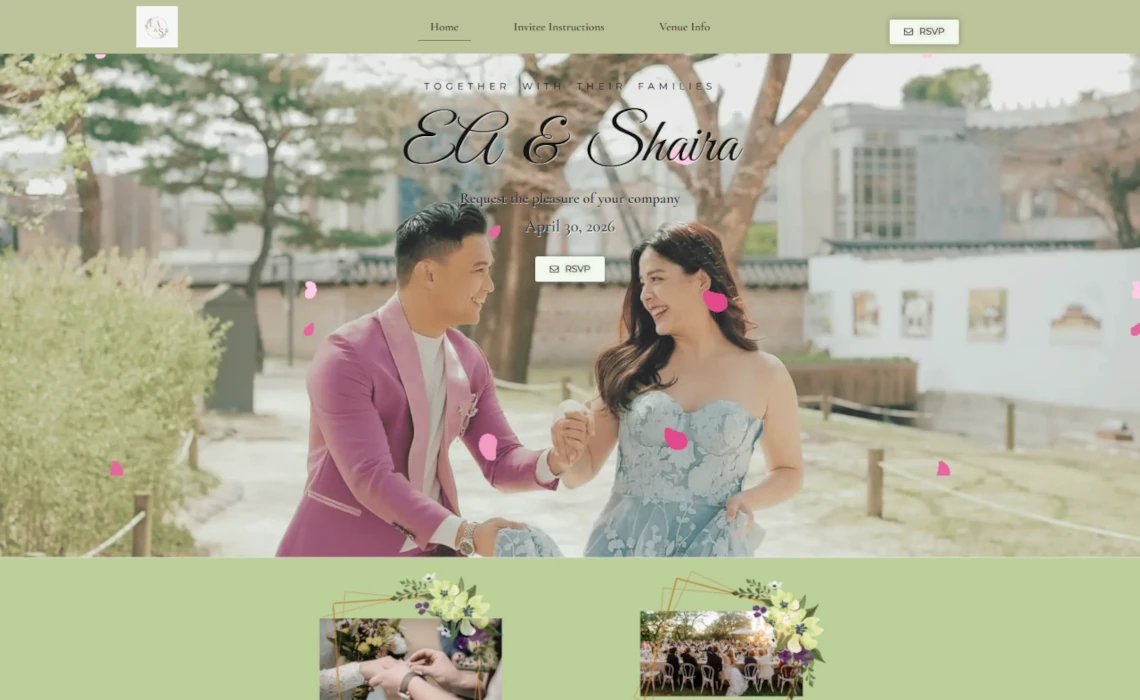
Fig. 1 — Homepage hero. Couple, date, and RSVP in one glance, no scrolling required.
Project Snapshot
The build, at a glance
Project Name
EA & Shaira Wedding Website
Team Size
5 members
Duration
Course capstone timeline (multi-week sprint)
Platform / Stack
WordPress + Elementor Pro, hosted on Hostinger
Project Type
Web Design & Development course capstone (team project)
Our course required each team to design and build a fully functional wedding website using WordPress and Elementor Pro — no shortcuts, no page builders with training wheels. The assignment was structured to simulate exactly what happens on a real client engagement: gather requirements, plan the information architecture, design before you build, and ship something that actually works on a live server.
Treating an academic brief with client-level rigor is exactly the habit that separates a hobbyist from someone ready to run an agency.
A clear primary action, a story the visitor needs to believe, and supporting pages that answer every practical question before the visitor has to ask.
My Role & Process
Four deliverable phases, one person at the center of all of them
I led the project through four required deliverable phases — sitemap, wireframe, mockup, live build — and my responsibilities sat at the center of each one.
01
Sitemap
Canva Pro
Mapped the site's structure first — Home, RSVP, Venue Info, Invitee Instructions, and a Thank You page triggered after form submission — before anyone touched a design tool.
02
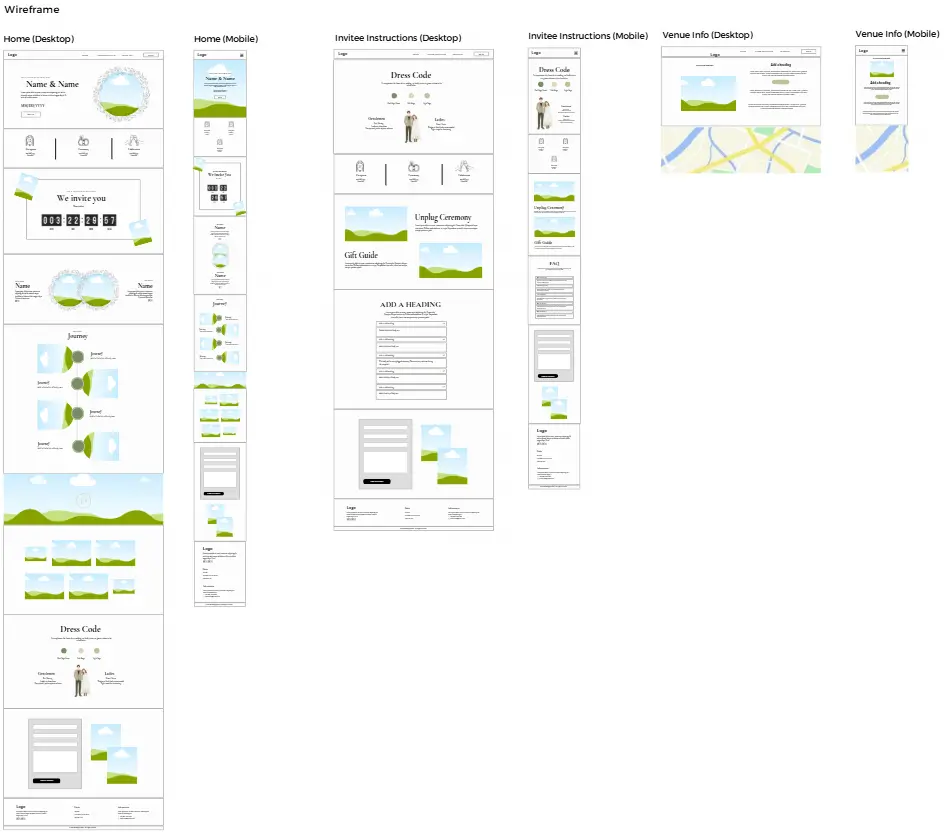
Wireframe
Canva Pro
Laid out low-fidelity wireframes with the team, focusing on where the countdown timer, love story timeline, and RSVP CTA needed to sit so the primary action stayed impossible to miss.
03
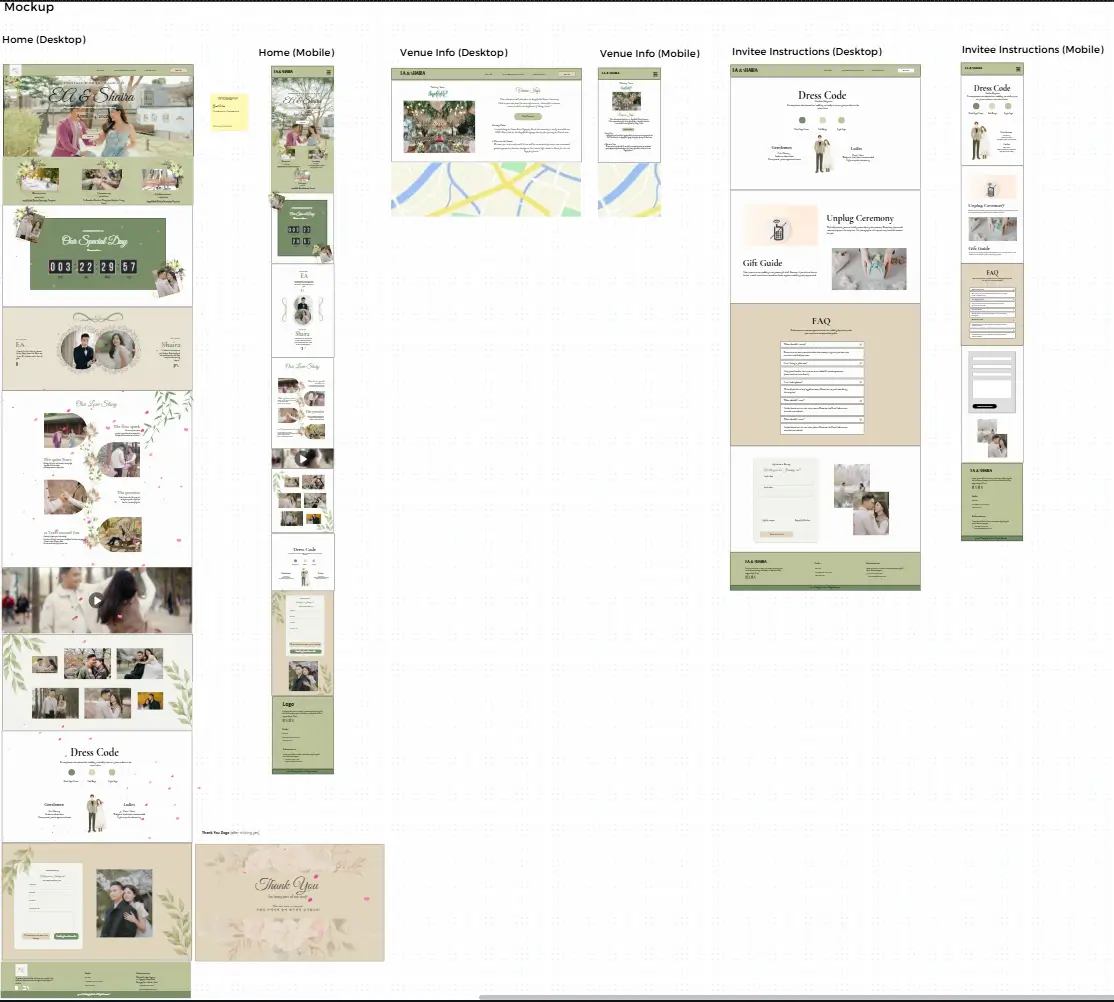
Mockup
Canva Pro
Contributed to the design mockups and led the final refinements — locking in the color direction, typography, and layout details that carried through into the live build.
04
Live Build
WordPress + Elementor Pro
The heaviest lift: building the page structure in Elementor Pro, integrating a Fillout-powered RSVP form styled to match the site, and wiring up the countdown, timeline, and navigation — hosted and tested live on Hostinger.
Design & Development Highlights
Not a template with names swapped in
Every section was a deliberate decision about what a wedding-website visitor actually needs to see, in what order.
/#countdown
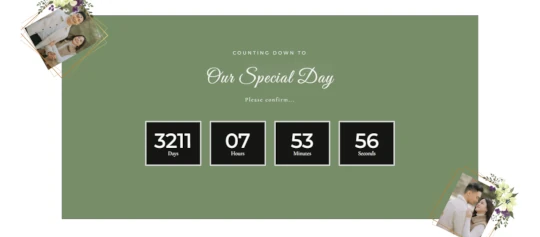
Fig. 2 — Live countdown. A live countdown to the big day, framed by two of the couple’s photos.
Live countdown timer
Four dark stat blocks — days, hours, minutes, seconds — sit against a deep sage-green background, with two of the couple’s photos gold-framed and anchored at opposite corners. The high-contrast blocks make the countdown legible at a glance, and the corner photos keep the section from feeling like a bare utility widget.
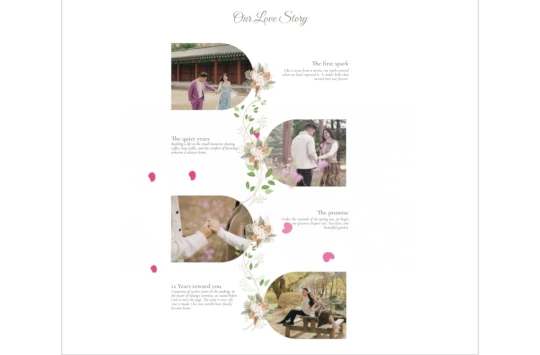
"Our Love Story" timeline
A four-part narrative — The First Spark, The Quiet Years, The Promise, and 12 Years Toward You — laid out as alternating arch-shaped photo frames connected by a single illustrated floral vine, with each chapter title set in the same script typeface as the hero. It turns a static info page into something guests actually want to read.
/#our-story
Fig. 3 — Our Love Story timeline. A four-chapter love story told through alternating photo frames and a single connecting floral vine.
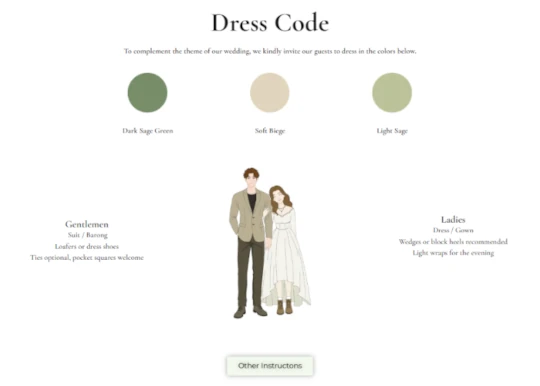
/#dress-code
Fig. 4 — Dress code. Dress code made visual — color swatches, an illustrated couple, and clear guidance by gender.
Dress code section
The palette is shown as filled color swatches, not just named, paired with a custom illustrated couple graphic modeling the look and separate bullet guidance for gentlemen and ladies — removing the single most common source of wedding-guest confusion.
Dark Sage GreenSoft BeigeLight Sage
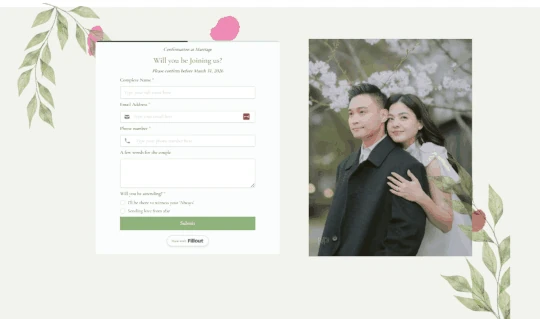
RSVP form
Rather than building form logic from scratch, I embedded a Fillout form directly into the Elementor layout, styled to match the site’s color and type system — capturing name, email, phone, an optional message for the couple, and attendance status. Pairing a lightweight no-code form tool with a fully custom Elementor design is the same build-vs-integrate call I make on client sites.
/rsvp
Fig. 5 — RSVP form. A Fillout-powered RSVP form, restyled to blend into the site’s design system.
Hero section
A soft sage-green nav bar sits above full-bleed botanical portrait photography, with hand-drawn pink petal accents. The RSVP CTA appears twice — nav and hero — so it's never more than a glance away.
Ceremony & reception details
A dedicated block states the venue plainly — St. Benedict Parish and Westgrove Heights in Silang, Cavite — so out-of-town guests aren't hunting through paragraphs for logistics.
Footer & navigation
A venue map link, contact info, and site-wide navigation live in the footer, with a mobile-responsive off-canvas menu so the experience holds up on the phone screens most guests actually use.
Team Collaboration
Keeping five people aligned was its own project
With four teammates supporting design input and information gathering, keeping five people aligned on one deliverable schedule was its own project.
That combination of a visual task tracker and a single shared document source is the same lightweight system I still rely on for client projects today.
Trello — task delegation
Managed task delegation through a Trello board, breaking the sitemap-to-launch timeline into assignable cards.
Google Docs — shared content source
Used a shared Docs structure for content collection — copy, venue details, love-story content — so development never stalled waiting on someone else's input.
Challenges & Solutions
The most transferable part of this project
A few real problems came up — and solving them is arguably the most transferable part of this project.
Challenge
Elementor Theme Builder conflicts
Overlapping header/footer templates created rendering issues on certain pages.
Solution
Audited which templates were actually assigned where and consolidated to a single consistent template per condition.
Challenge
Staging URL issues
Moving between environments introduced broken references that needed to be tracked down.
Solution
Corrected every broken reference before the site was presentable on the live Hostinger URL.
Challenge
Coordinating around busy schedules
Five people, five different course loads, all needing to contribute on time.
Solution
The Trello board became the only thing keeping the timeline honest — clear ownership per card meant progress didn't depend on everyone being available at once.
Outcome
Recognized as the best-designed website among competing teams.
The team presented the completed project through a recorded video walkthrough demonstrating every deliverable and how the underlying skills were applied. Judged by a panel of evaluators alongside audience feedback — likes, comments, and reactions on social media — our live site came out on top.
Skills Demonstrated
What this project proves
WordPress Development
Elementor Pro
UX Wireframing
Third-Party Tool Integration
Project Management
Team Leadership
See It Live
Browsable in full — not just a mockup
The EA & Shaira wedding website is live and browsable in full, from the countdown timer down to the RSVP form.